Introduction to E-learning tools
Slack
What is Slack?

It is a professional community platform for communication.About Slack
we can create channels as wish to our needs. Like other social medias whats app, viber its also a place like that to chat but it is professional. Now we create 2 channels one is General and other is random. General for the normal daily activities, chats and random for the events that to do in special occations. Not only this two we can create more to our needs. We can also take a call there and chat personally. It also have the facility of mention a person using @ symbol as we do in other social media groups. Ans also it also have the version to work on mobile phone.
Trello
What is Trello?

It is a project or assignment management application based on e web or online.
About Trello
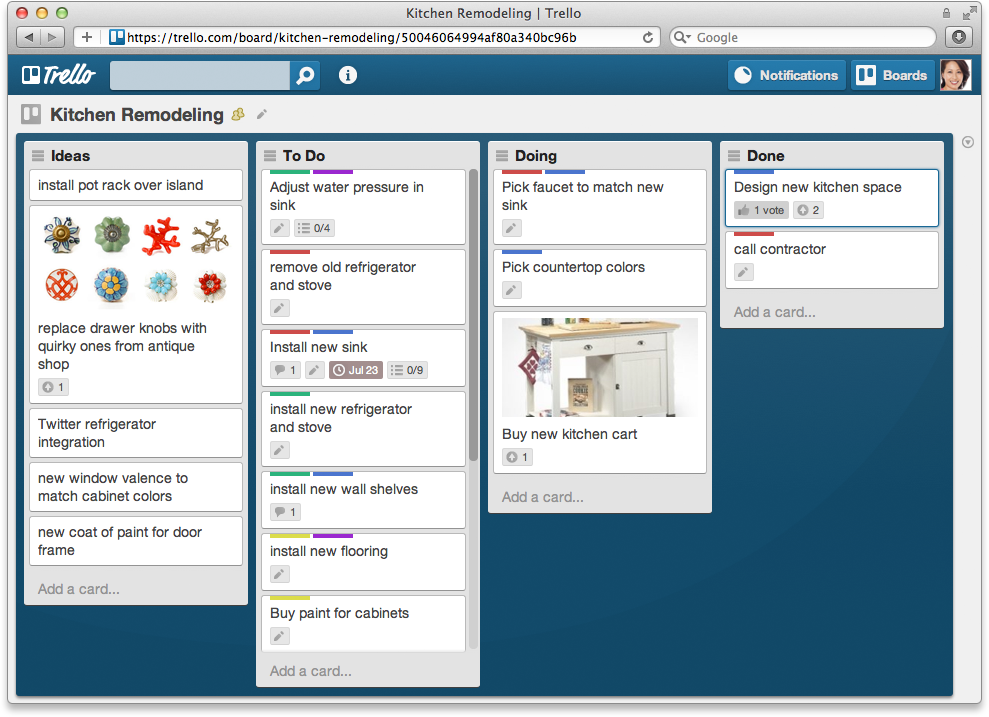
Simply its like a copy or notepad in windows. It like be a calender which remains us what work we have do in following. For that first we should plan the certain incident and put an schedule for that and work to the schedule. Take a certain work schedule the events what to do and divide the sessions like what we had done, what in progress, what to do next. It show us the deadline of our work we have to finished.
The following picture will show the simple concept of the Trello
Google classroom
What is Google classroom?
 It is a free e-based basement for the e learning.
About Google classroom
Simple its like our ordinary class room. In a class we have paper, assignments, notes to refer and son on. Like the same here is is web-based or paperless is a different. Sharing files, notes is an easy way in google classroom. It access through the email. Admin or teacher have the access to monitor it and add comments also. Share links, photos, videos, discussion facilities and so on.
What is Kalvaro?
It is a touch typing tutor.
Kalvaro
What is Kalvaro?

About Kalvaro
It is helps to improve our touch typing . There are about 45 exercises to do. It provides the instructions about how to use the kalvaro. Correct positioning of hand and fingers is efficient. It clearly explain the terms with the picture description. There is a small bump in the keys F and J. It is the key to identify the correct positioning of the finger. Thumbs lay in spacebar and wrist is placed in the remain of the keyboard.
The following will show it simply

The following will show it simply
No comments: